|
|
|
Hardware Review
The Kenwood TS-570D(G) transceiver (I) For many years I had the intention to replace my old analog and tubes HF transceiver by a new solid-state model working exclusively from 160 to 10 m in CW, USB and LSB modes with some excursions in AM and digital modes. Knowing the high price of new equipments, I wanted to buy a base model but I didn't want to invest more than 1000-1500 € with accessories. Was it a dream ? Not at all ! After have read commercial documentation from the main manufacturers, and technical reviews on ham forums, I choosed Kenwood TS-570D, and I don't regret it. The first reason is that this rig was at the time of its release (1998) the most reviewed model among almost all available transceivers: over 65 reviews in two years on eHam.net (106 reviews as on 2006) where other models reached with difficulties 20 reviews (except some high-ends that exceeded 120 reviews) ! It was already a good indication of ham interests in this model. At very few exceptions, all reviewers, from stateside and europeans appreciated much this new transceiver because of its performances, its affordable price (in 2002 a new one cost 1700 € or $1100), its reduced volume and weight as well as its attracting look. So I decided to buy a secondhand model. I was not disappointed at all ! See by yourself. This review was written in 2002 and updated in 2004, after have worked with this transceiver 18 months, once I mastered well the rig and its features. Visit the website of TS-570 designer Toshii Torii, JA6QXW
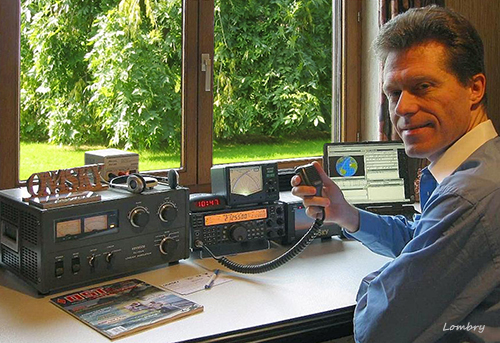
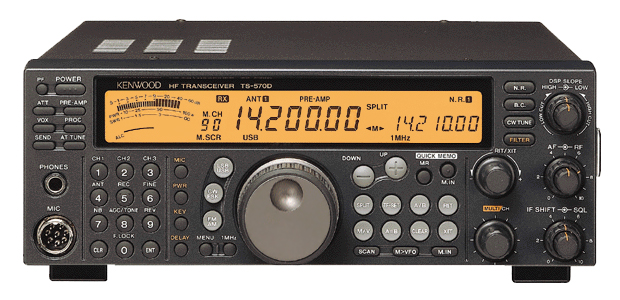
The object of our covetousnesses. Thanks to this transceiver, in a couple of months I sent over 1000 QSLs in most CQ zones, so I can tell you that this rig is a good performer. I tested it with five different antennas, a 40 m long wire, a 31 m long G5RV multi-band dipole, a 40 m long Windom, a 40 m long W3DZZ, a 6 m long Fritzel GP-404 vertical, and a 3-element Fritzel beam cut for 20, 15 and 10 meters erected 8 m high. I can say that being able to work bare foot 85 DX entities in SSB during the 48-hour CQ WW contest (last weekend of october) could be interpreted as a sign of excellence for such a small rig (note that the best operators using high power and a large beam reach 150 DX entities) ! The technology used in this transceiver explains its performances, although we will have to ponder this appreciation from a technical point of view. In short the quality Digital Signal Processing (DSP) helps you in all modes in discrimining weak signals, extracting them from the noise and interference or enhancing your modulation in tailoring your audio. However the way that the DSP has been designed reduces somewhat its performances. Anyway, as wrote Kenwood in its ads, this rig includes a "computer-based human interface that provides effortless operation and even on-line information" with an affordable DSP. All that is true. First out of the box impression Kenwood TS-570D can be considered as a portable transceiver. As all Kenwood lines of products, the cabinet is metallic, charcoal colored, all screws are apparent, black anodized, with a special body designed fit on the front panel.
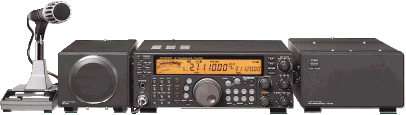
This front panel assembly gives to this rig a modern look, from buttons to the large amber-colored backlit LCD display. However this is not a professional design what this rig is not either. Rather small (27x10x27 cm), not too heavy (6.8 kg), it is equipped with a handle and a retractible aluminium bail very appreciated if you want to place it on your desk. Once pushed forward this bail raises the front side of the rig a few centimeters above the desk in order to reach easier buttons located in the lowest part of the front panel. To be in line with the serie, the optional external speaker SP-23 is also provided with a similar retractible bail. However, this external speaker doesn't provide the least adjustement and doesn't really improve the sound quality emitted by the RTX internal speaker, excepted that its sounds is a bit lower in frequency due to its large cavity. In my humble opinion it doesn't perform better than a cheap multimedia speaker and it is surely not as good as a DSP speaker (e.g. Yaesu SP-8). At last it is quite cumbersome (23x10x12cm) without offering much advantages other than completing the line of products. So if you need a performing speaker, please purchase a DSP model to a competitor. This transceiver comes without DC power supply. Kenwood recommends the PS-52 unit. This is a 120/220V PSU that outputs 13.8V at 16A. Its consumption is consequent : 500 W. Its size are 33x18x13.5 cm and its weight exceeds 7 kg. Its price is about 130 €. It works without the least noise and doesn't even get warm during long QSOs, contrarily to the transceiver. This power supply is an excellent investment that works with many other transceivers and peripherals. The transceiver is really not cumbersome, and it is small enough to stand on your desk between your computer screen and another peripheral, on a small table for field days and portable operations or on in your car dashboard. For a semi-permanent installation in a car, Kenwood provides optionally a mobile mount ref.MB-430. About the microphone, I kept the hand-held model provided from factory with the transceiver for its small size and low weight in portable or mobile operation. It is not equipped with DTMF functions but come only with three buttons, a PTT and up/down to change frequencies but it gives me total satisfaction. However, if your transceiver is not grounded, sometimes you could feel weak returns of current by the metallic handle attached at the rear of the mic that comes close to your mouth when you speak at the mic, all the more when using a linear amplifier or working mobile without grounding. So, remember the good practices and ground your installation before emitting to prevent this small annoying problem entirely imputable to the operator...
The rear side of the transceiver is complete : it includes a large fan rather silent, a four-entry power jack, two keyers inputs (straight key and paddle), a jack for the optional external speaker, a DB9M serial interface, a 7-pin DIN (REMOTE) connector for a linear amplifier, a 13-pin DIN (ACC2) for another external peripheral (a packet device, FAX, clover, SSTV, phone patch, etc), and last but not least 2 antenna PL female connectors. Of course the serial interface can be connected to another transceiver via a cross-wired cable or to a computer via a straight cable. All this connectic and much more is explained in the fully documented manual that also list parts, semiconductor data and all possible adjustements. On the front side are placed the usual microphone entry (desktop or hand-held model) and the (stereo) headphones jack (dia. 6mm) Due to its medium size and large amber LCD display the transceiver looks first like a scanner or a high-end gadget à la James Bond using the latest technology. This is probably for this reason that I have seen it more than once in the background in spy films or films dealing with telecommunications and other hi-tech, Hi ! But it is far to be a sealed blackbox for spying or a toy for kids, and TS-570D hides a good performer. The front panel displays a numeric keypad, several push buttons and a multi functional knob (MULTI CH) associated with memories or scrolling menus displaying settings on the large LCD display. All buttons and display are intuitives, and I read the manual only twice while using the rig to understand its main functionnalities, mainly the way of using the DSP features and memories. In fact this TS-570D transceiver is a mid-range model. It is really made for the casual amateur or the one who prefer to use mid-class transceiver and invest in a better antenna system ! This is no without reason that it was offered by his soon to an 86 years Old Timer or that is has been selected by ACS/RACES HF radio for the State of California, Governor's Office of Emergency Services as well as for ON6NR radio club : its DSP features, its reduced size, its ease of operation and its cost place this model at the top rank of favorites RTX in its category. The front panel At first sight the front panel is digital without doubt. The amber LCD display predomines on the upper half part of the rig. If you don't like that, sorry the voyage stops here and you have to select another model more traditionnal.
The LCD display is very clear, without the least dim area or defect, and its brightness is adjustable with a 4-stage dimmer accessible with the Menu #00, the default being set on "d2". The scrolling text messages are complete and virtually eliminate most reference to the manual once you are used to play with the buttons MENU, UP/DOWN, MULTI CH and the numeric keypad.
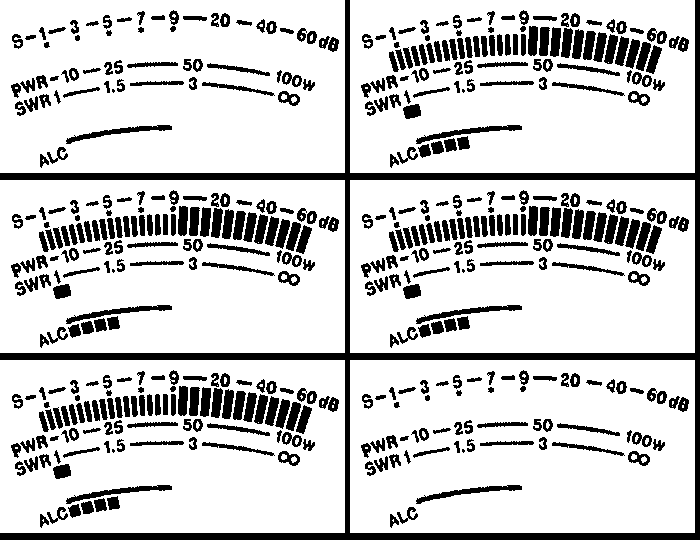
Another feature working in the other modes than FM, is the AGC control located in the middle of the left panel. It can be used to modify the time constant using by the S-meter to react face to a change in the input signal. However, the AGC cannot be disabled. Usually a fast time constant is used for high speed CW, when receiving weak signals or when tuning rapidely. The default constant is "slow" for SSB and AM, "fast" for AM and FSK. It must be checked if you work in CW with a linear amplifier too. The same control manages also the Tone, a feature which utility is not trivial. Indeed, I observed that in conditions of heavy beating QRM, the AGC/TONE gives a worst result than switched off; it produces pulses or seem to increase the level of QRM ! This is maybe a physiological feeling but it produces real effects ! Then there is the digital Vu-meter. Although it looks great, works fine and is accurate, some meters are exclusives : while emitting you cannot display at the same time the ALC and compression level or worse, the Power and SWR. It is a pity because these two last ratings are very useful to know the tuner output power. Of course we can get these values reading any external SWR-meter, a peripheral that any amateur must own to know the true power emitted by his antenna system.
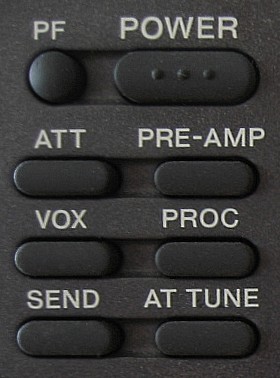
The POWER on button located at the upper left corner is clever. Usually when you push a button it reacts immediately, hopefully. This one not ! Kenwood engineers probably recognized that placing the switch on/off near the top of the rig or near another button can trouble some users : imagine that you switch off your rig in place of selecting a memory or a filter... For the least annoying ! But Kenwood is clever. If you push by mistake on the power on/off, nothing happens... What's wrong ? Don't panic, this is excellent ! In fact to activate it you have to push and hold it down until the message "HELLO" is displayed on the screen. This is a very good initiative as during the first three months I worked with this transceiver, I probably pushed on it by accident once a month as it is placed just above the PRE-AMP button used to activate/desactivate the audio stage preamplifier (called AIP to other Kenwood transceivers).
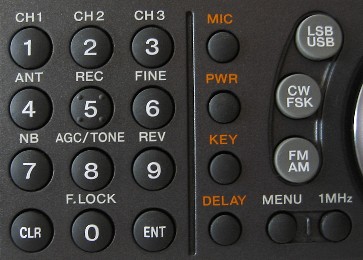
At left of the main frequency knob is the large numeric keypad, the mode selector and a push button called "MENU" that lets you think there is digital menu-driven and processing capabilities in this rig... Indeed the TS-570D offers you an hundred of memories and nearly hundred of settings, so much options that you can virtually no more ignore your settings or forget any frequency ! These settings are stored in memory and are displayed as scrolling text messages in the right part of the LCD display. These functions request however some electricity to be activated. So like electronic agenda or clocks, after about 5 years if you can no more store your data or lost them by intermittence, think to replace the small 3V battery hidden in the front panel. The front panel permits to enter a frequency manually (ENT button plus numeric pad). This is very convenient, even if there is one constraint : to enter 3.6 MHz for example you have to type 036 enter, but all trailing 0 are automatically added to display 3.600.00, and this way of working in at the end very practice and fast.
They are so many options available on this rig that Kenwood installed a multi function knob on the front panel labelled MULTI CH in orange. This is by this knob that you set all options. After have pushed on the MENU button and rotated the MULTI CH button, you don't have to remember what does each option displayed on screen to find the one you need. Indeed, a scrolling text message written in plain english helps you finding the good option. In addition some buttons are highlighted with orange characters or include a double inscription . At last as usual the Audi/Radio Frequency gain (AF/RF) permits to adjust signal according the value display on the S-meter. In addition the Squelch (IF SHIFT/SQL) permits to eliminate background noise when no signal is present. This latter feature is mainly used in FM mode. There is however no Notch filter on this transceiver. This is really a major lack on this rig for some obscure reason. A notch filter is indeed as useful as a the noise reduction (N.R.) or the AGC. The notch shows a profile in V-shape that helps to suppress an undesired carrier, voluntary tunes or a CW station placed just on your working frequency and that disturbs your working conditions. TS-570D and all other models of this series are unable to remove such a signal and we have to rely on the few other DSP functions (see next page). This is the first example where we feel drawbacks of using a mid-range transceiver. Ergonomy side Kenwood uses and abuses of its MULTI CH and scrolling text messages what is a very convenient. Although the settings for Mic, Power, Key and Delay are accessible via this multifunctional button they are also directly accessible thanks to four push buttons located just ar left of the tuning control knob. In my opinion there is no reason to double these settings on the front panel, excepting if you change their settings at each QSO, Hi ! There are many other DSP features that are much more important and that might request a direct access as well. At last, although all five operational buttons (DSP SLOPE, RIT/XIT, AF/RF, MULTI CH, IF SHIFT/QSL) are well grouped on the right side of the front panel, like on many transceivers, they are a bit too small and not enough spaced if you have large hands. Excepting DSP slope that is apart from the other buttons, these controls might be placed on the same line instead of being placed in a square for a better hold in hand, always for a simple question of available space. But Kenwood has probably had to find a compromise due to the limited size of the front panel.
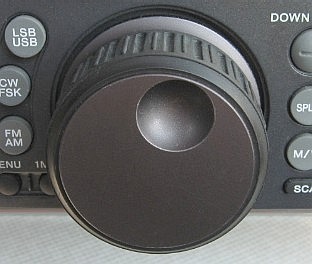
In the middle if the front panel, a bit shifted to the left is the voluminous tuning control or frequency knob. It is very smooth and accurate, although perfectible. Indeed, at some occasions, rare, it turns itself of 1 or 2 Hz. It could be more silent too, specially when you turn it quickly. Globally its performances are excellent, and still more when coupled with the FINE button which increases 10 times its step for an accurate tune on frequencies. This fine adjustment is very useful when you try to locate a narrow signal lost in a crowded band. The rubber protection is fluted, offering an excellent hold for fingers but the design is so deep that dust becomes easily embedded in the pattern and it is not always easy to extract it. A pattern less deep, offering a smaller relief should be appreciated.
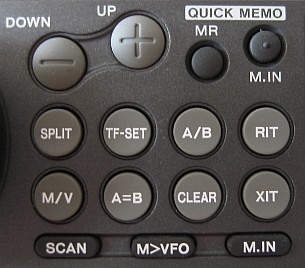
On the plus side, if you can instantaneously store a frequency in memory to recall it for a later use, you can also desactive the tuning control by pressing the Frequency Lock (F.LOCK) button. Once pressed you can turn the knob without affecting the VFO, the knob is desactivated. A good thing if you don't want to change of frequency for a long time or risking to lost it if you don't store it in memory. The RIT/XIT button placed at right of the tuning control knob helps you to split frequencies (to emit on one and listen to another) at ±10 kHz which is enough for any pile-up. When the FINE tuning is ON the XIT step size is 1 Hz. Due to the gearing equipping the RIT/XIT, this button provides also an smooth feeling between your fingers. However I have take time to understand that the RIT/XIT could be zeroed instantaneously using the CLEAR button in place of turn it back to zero ! For that purpose the RIT/XIT could have be associated with a push button for instant reset in place of using a separate button. Next chapter
|